Coffee bag scanner
Scan a coffee bag and remember every coffee you try
Point your phone at the front of a coffee bag and Brewtifi finds the coffee for you: the roastery, the origin and the flavour notes. Save it in one tap, so the next time you want that bag again you know exactly what to buy.


Free on iPhone and Android.
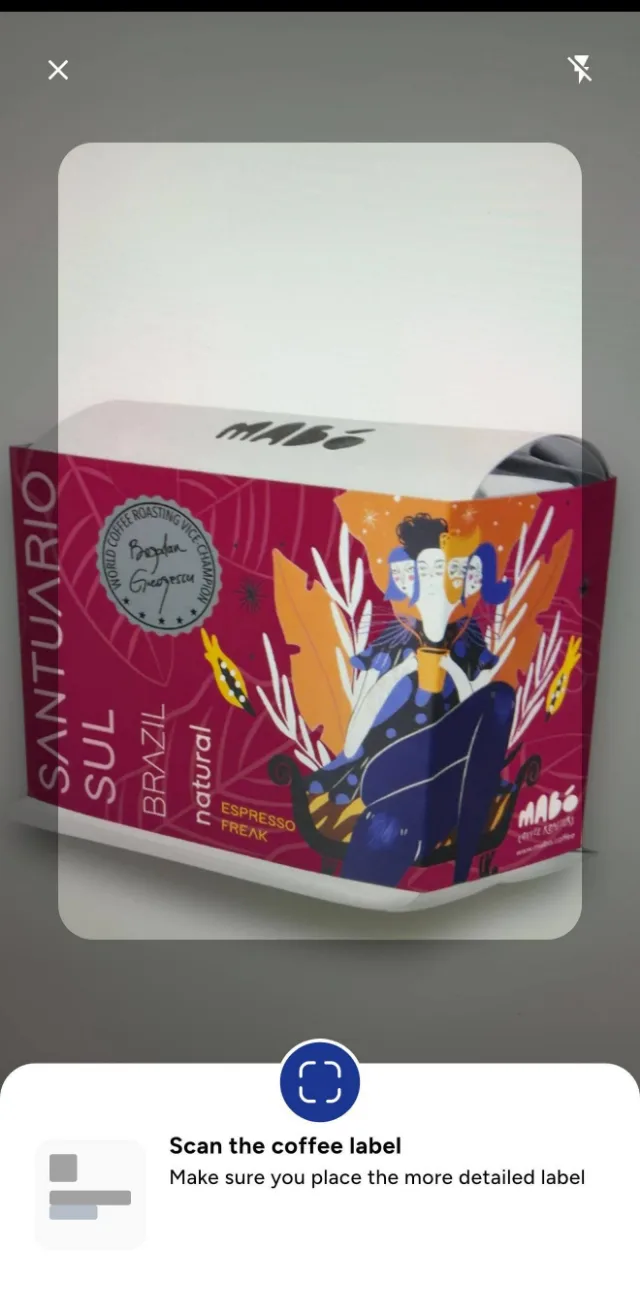
How coffee scanning works
Scan the bag
Hold your phone over the front of the coffee bag. Auto scan locks onto the package when it is steady, or you can pick a photo from your gallery.
Confirm your coffee
Brewtifi shows the best matches and asks whether one of them is your coffee. Similar coffees are shown too.
Save and explore
Open the coffee details, save it to your favourites and add your own notes about how it tasted.
Stop forgetting the coffees you loved
Most specialty coffee drinkers know the feeling: you finished a great bag weeks ago and cannot remember the roaster, the farm or the process. Scanning takes a few seconds and keeps that coffee in your Brewtifi account, with the details that make it easy to find again.
What you see after a scan
Each coffee page brings together the information printed on the bag and what the community knows about it.
- Roastery and coffee name
- Origin, varietal and processing, when available
- Flavour notes
- Similar coffees you might like
A new coffee? It can be added
The Brewtifi coffee library grows with every scan. If a coffee is not recognised yet, you can ask for it to be added and Brewtifi prepares a page for it, so the next person who scans that bag finds it straight away.
Frequently asked questions
Which coffee bags can I scan?
Scan the front of a specialty coffee bag with a clear, well lit photo. Brewtifi matches it against its coffee library and suggests the closest matches.
What happens if my coffee is not recognised?
You can choose None of these and ask for the coffee to be added. Brewtifi then prepares a page for it.
Can I scan a photo I already took?
Yes. You can pick a photo of the coffee bag from your gallery instead of using the camera.
Is the coffee scanner free?
Yes. Brewtifi is free to download on iOS and Android, and scanning is part of the free app.
Get the Brewtifi coffee app
Find specialty cafes, scan coffee bags and explore Cafe Maps. Free on iPhone and Android.