Owner Center
Run your coffee place from the Brewtifi app
Claim your place, keep its details and photos current, invite your team and see how guests find you. Everything happens in the Brewtifi app on your phone.

Scan with your phone Owner Center opens in the Brewtifi app. No app yet? Get it below.


Open Owner Center works on a phone with the Brewtifi app installed.
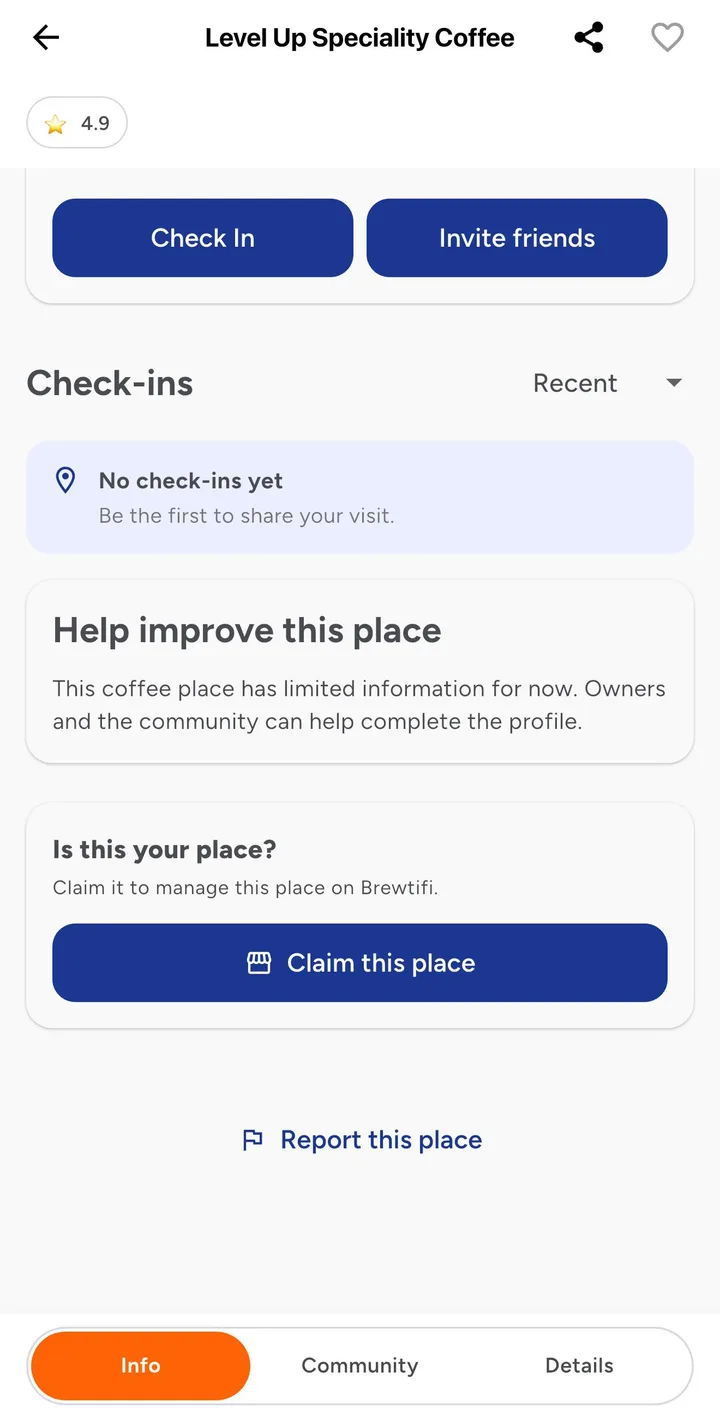
How to claim your coffee place
Find your place
Open Brewtifi, search for your coffee place and open its details.
Claim this place
Under "Is this your place?", tap Claim this place and choose how to verify it.
Get verified
If your account email matches the email of your place, you can manage it straight away. Otherwise the Brewtifi team reviews your claim first.
What you can do in Owner Center
Your details
Keep your details, opening hours and contact information current.
Photos
Add photos so people recognise your place before they arrive.
Your team
Invite the people who help you run it, each with their own access.
Insights
See how guests find you and what they are looking for.
Frequently asked questions
My coffee place is not on Brewtifi yet. What can I do?
Open the Brewtifi app and suggest a new location. It is reviewed before it is added to the map, and then you can claim it.
Someone else already manages my place.
You can still send a claim from the place in the app. The Brewtifi team reviews it.
Can the people I work with help?
Yes. Invite the people who help you run your place from Owner Center, each with their own access.
Does my place appear on the city guides?
When your city has a Brewtifi city guide, coffee places managed by their owners are listed on it.
See which cities have a guide on Brewtifi city guides.
Get the Brewtifi app to claim your place
Free on iPhone and Android. Claim your coffee place from its details in the app.